
雙機熱備
1. 介紹
文章主要介紹,
EasySwoole使用雙機熱備思路實現代碼不中斷部署。
2. 學習案例
-
- 先部署
9501服務
- 先部署
-
- 單起一個進程,定時輪詢
Git分支是否有新版本發布
- 單起一個進程,定時輪詢
-
- 如有新版本發布,
clone一份
- 如有新版本發布,
-
-
composer update更新庫
-
-
- 啟動
9502服務
- 啟動
-
- 更改
nginx配置為9502并重啟
- 更改
只要有新版本發布,就輪詢上面那幾個步驟
整個過程的簡單架構圖
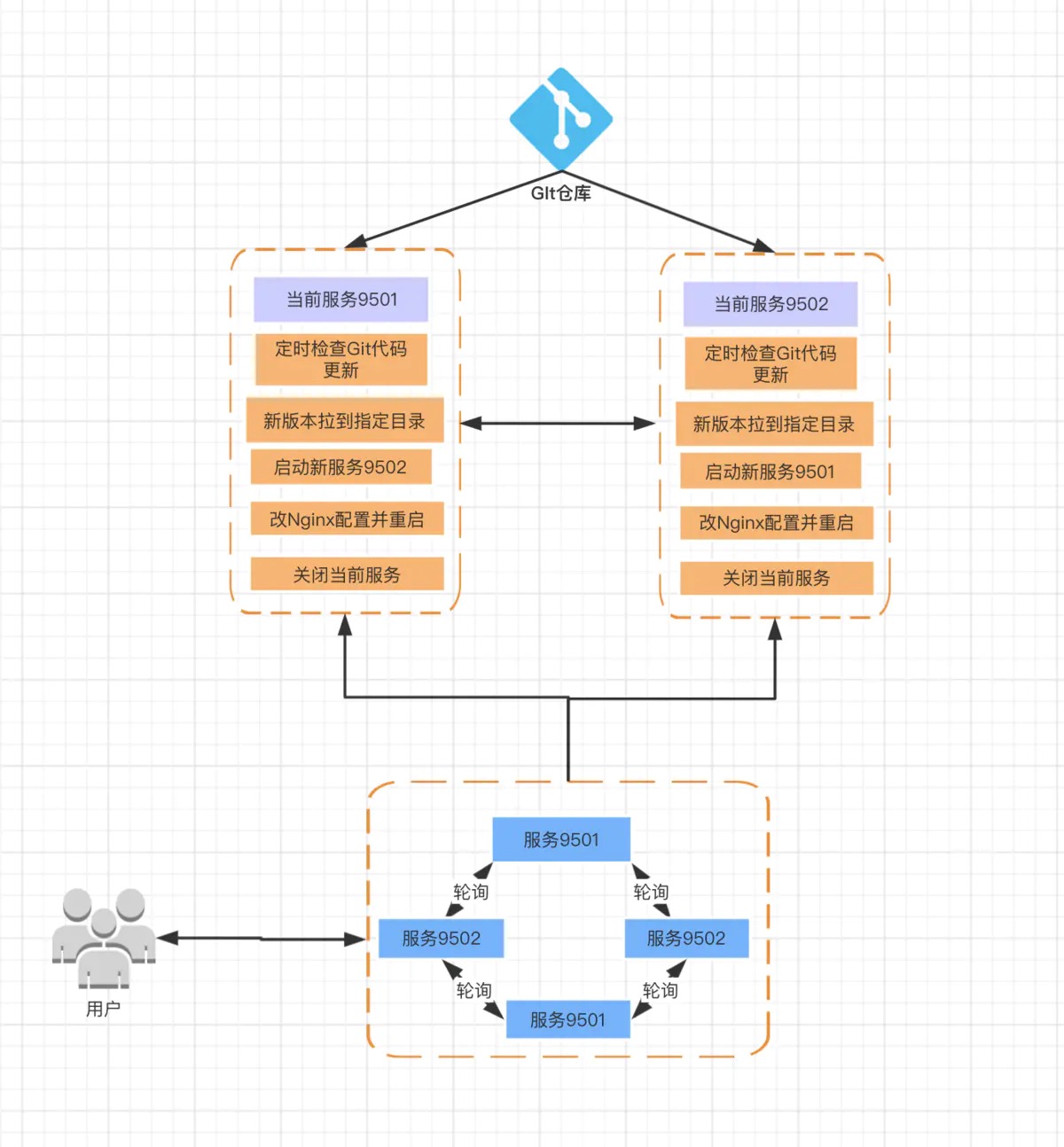
3. 需要提前了解的知識點
4. Nginx 配置
nginx.conf 配置文件示例
當有新版本發布的時候
EasySwoole自定義進程會將nginx.conf的端口改為最新服務的端口
worker_processes  1;

events {
    worker_connections  1024;
}

http {

    include       mime.types;
    default_type  application/octet-stream;

    log_format  main  '$remote_addr - $remote_user [$time_local] "$request" '
                      '$status $body_bytes_sent "$http_referer" '
                      '"$http_user_agent" "$http_x_forwarded_for"';
    sendfile        on;

    keepalive_timeout  65;

    ### 輪詢配置(這里是重點)
    upstream  easyswoole_release_upstream {
        server 127.0.0.1:9501;
        server 127.0.0.1:9502;
    }

    include servers/*;
}
es-release.conf 站點配置文件
該配置文件在 servers 目錄下。(此示例是以 Mac 本地環境作為運行環境)
server {
    listen 80;
    server_name easyswoole.release.com;

    location / {
        root html;
        index index.html index.htm;
        proxy_pass http://easyswoole_release_upstream; ### 這里是重點
    }
    access_log /usr/local/etc/nginx/logs/es.access.log main;
    error_log /usr/local/etc/nginx/logs/es.error.log error;
}
5. EasySwoole 代碼實現
代碼只提供實現思路,并且這種腳本,最好單獨去做,比如用
shell腳本,防止服務宕機導致無法正常部署代碼
創建自定義進程類文件
<?php
/**
 * This file is part of EasySwoole.
 *
 * @link http://m.luan888.cn
 * @document http://m.luan888.cn
 * @contact http://m.luan888.cn/Preface/contact.html
 * @license https://github.com/easy-swoole/easyswoole/blob/3.x/LICENSE
 */

namespace App\Release;

use EasySwoole\Component\Process\AbstractProcess;
use Swoole\Coroutine;

class Release extends AbstractProcess
{
    public function dolog($msg, $filename = '/Users/xxx/sites/release_log.log')
    {
        if ($msg) {
            error_log($msg . PHP_EOL, 3, $filename);
        }
    }

    protected function run($arg)
    {
        go(function () {
            while (true) {
                $shellLog = ' 2>> /Users/xxx/sites/release_log.log';
                $this->dolog(date('Y-m-d H:i:s') . '開始檢測代碼是否更新 ===> START <=== ');
                // 檢查 Git 是否有新代碼發布
                $diffExec = 'cd ' . EASYSWOOLE_ROOT . '; git fetch; git diff --stat master origin/master;';
                $this->dolog($diffExec);
                $pullResult = exec($diffExec);

                $this->dolog('git fetch res: => ' . json_encode($pullResult));

                if ($pullResult !== '') {
                    $this->dolog('有新版本發布' . json_encode($pullResult));
                    // 新版本項目的目錄
                    $newVersionPath = '/Users/xxx/sites/release-' . time();

                    // 開始 clone, 初始化代碼
                    ### 這里需要換成自己的 EasySwoole 項目的 github 地址
                    $cloneExec = "git clone https://github.com/huizhang-Easyswoole/release.git {$newVersionPath} {$shellLog};cd {$newVersionPath} {$shellLog};composer update {$shellLog}; {$shellLog}";
                    $this->dolog($cloneExec);

                    $res = exec($cloneExec, $output, $returnVar);
                    $this->dolog('git clone res: => ' . json_encode($res, JSON_UNESCAPED_UNICODE));
                    $this->dolog('新版本代碼 clone end');

                    // 判斷當前是哪個端口正在服務
                    $lsofExec = "lsof -i:9501 {$shellLog}";
                    $this->dolog($lsofExec);
                    $lsofResult = exec($lsofExec);
                    $newPort = 9501;
                    $oldPort = 9502;
                    if ($lsofResult !== '') {
                        $newPort = 9502;
                        $oldPort = 9501;
                    }

                    // 將另一個閑置的端口,替換到新版本中
                    $this->dolog('開始替換端口' . $newPort);
                    $devConfig = file_get_contents($newVersionPath . '/dev.php');
                    $devConfig = str_replace($oldPort, $newPort, $devConfig);
                    file_put_contents($newVersionPath . '/dev.php', $devConfig);

                    // 啟動新服務(這一刻新舊服務是同時存在的)
                    $this->dolog('新服務啟動');
                    $startExec = "cd {$newVersionPath}; php easyswoole.php server start -d {$shellLog}";
                    $this->dolog($startExec);
                    exec($startExec);

                    // 替換 Nginx 配置
                    $this->dolog('開始替換 nginx 端口');
                    ### 這里需要換成自己服務器環境 nginx 配置文件所在的目錄
                    $ngConfigPath = '/usr/local/etc/nginx/nginx.conf';
                    $ngConfig = file_get_contents($ngConfigPath);
                    $ngConfig = str_replace($oldPort, $newPort, $ngConfig);
                    file_put_contents($ngConfigPath, $ngConfig);

                    // 重啟 Nginx 服務
                    $this->dolog('重啟 nginx ');
                    $reloadNgExec = "nginx -s reload {$shellLog}";
                    $this->dolog($reloadNgExec);
                    exec($reloadNgExec);

                    // 停掉舊服務
                    $this->dolog('舊服務停掉');
                    $stopExec = "cd " . EASYSWOOLE_ROOT . "; php easyswoole.php server stop {$shellLog}";
                    $this->dolog($stopExec);
                    exec($stopExec);

                    // 每 30 秒同步一次代碼
                    Coroutine::sleep(30);
                } else {
                    Coroutine::sleep(10);
                    $this->dolog('無新版本更新');
                }
            }
        });
    }
}
注冊自定義進程
在框架的 EasySwooleEvent 事件(即項目根目錄的 EasySwoolEvent.php)中注冊自定義進程,示例代碼如下:
<?php
/**
 * This file is part of EasySwoole.
 *
 * @link http://m.luan888.cn
 * @document http://m.luan888.cn
 * @contact http://m.luan888.cn/Preface/contact.html
 * @license https://github.com/easy-swoole/easyswoole/blob/3.x/LICENSE
 */

namespace EasySwoole\EasySwoole;

use App\Release\Release;
use EasySwoole\EasySwoole\AbstractInterface\Event;
use EasySwoole\EasySwoole\Swoole\EventRegister;

class EasySwooleEvent implements Event
{
    public static function initialize()
    {
        date_default_timezone_set('Asia/Shanghai');
    }

    public static function mainServerCreate(EventRegister $register)
    {
        ###### 注冊 雙機熱備服務 自定義進程 ######
        $processConfig = new \EasySwoole\Component\Process\Config([
            'processName' => 'Es-release', // 設置 自定義進程名稱
            'processGroup' => 'Es-release', // 設置 自定義進程組名稱
        ]);
        \EasySwoole\Component\Process\Manager::getInstance()->addProcess(new Release($processConfig));
    }
}
6. 測試
綁定 host
127.0.0.1 easyswoole.release.com訪問 easyswoole.release.com
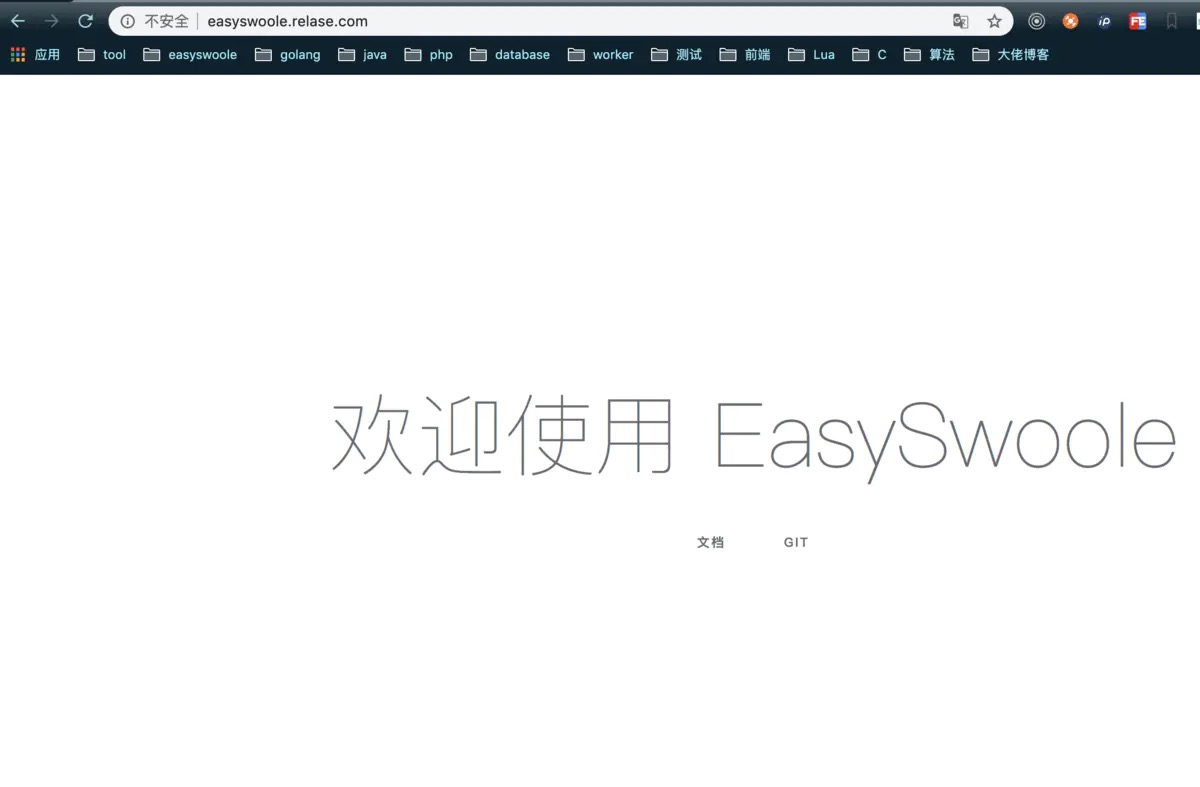
查看 Nginx 配置的端口
?  nginx cat nginx.conf | grep 950
           server    127.0.0.1:9501;
發布新版本
重新
clone一份代碼,更改內容提交。
查看Nginx配置的端口
?  nginx cat nginx.conf | grep 950
           server    127.0.0.1:9502;